PhotometricContinuumSubtraction

Automated photometric routine for continuum subtraction
Introduction
PhotometricContinuumSubtraction, or PCS for short, is a fully automated routine for continuum subtraction. You provide linear narrowband and broadband data, and using a photometric routine, it will automatically calculate and apply the mathematically optimal weights. This provides a robust and fast method of estimating and subtracting continuum signal from your narrowband data. As of version 1.4.0, PCS now can use multiple broadband reference images to produce a refined composite reference, yielding better results than can be achieved with a single reference.
Documentation
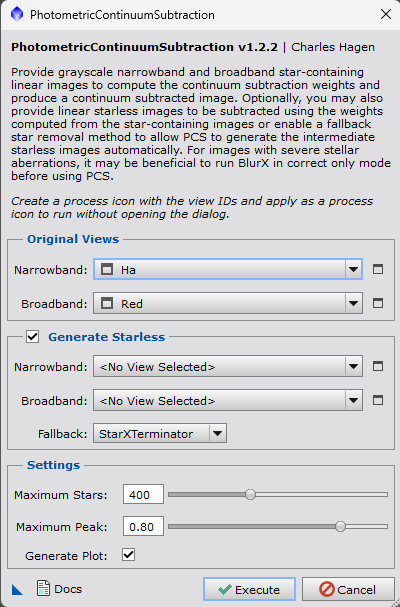
The PhotometricContinuumSubtraction script can be configured to run either with or without the dialog. If you use the Rename Images Script or if you use a consistent naming scheme for each filter’s image, the script can be saved off into a process icon and dragged onto any active image to run the script. If you prefer to configure the script each time, you can launch the script dialog under Scripts > NightPhotons > PhotometriContinuumSubtraction.
Source Views
Narrowband - Select your target narrowband image to be continuum-subtracted.
Broadband - Select your reference broadband image(s) to be used to form the continuum composite model and click the + to add it to the selection. At least one broadband image is required.
Generate Starless
Generate Starless Checkbox - Toggle the starless routine. When enabled, a second image will be produced using the same subtraction weights as the star-containing image, but with the stars removed from both the narrowband and the continuum reference image.
Method - Select from StarNet V2 or StarXTerminator.
Settings
Maximum Stars - This field controls the maximum number of stars that will be included in the calculation, higher values will include more stars which will take longer, but may provide more accurate results. Default value is 400 stars.
Maximum Peak - This field controls the maximum peak value that a star can have to be included in the flux calculation, higher values will be more tolerant of brighter stars and may begin to include saturated stars, which can degrade the performance of the routine. Default value is 0.8.
Generate Plot - Plot narrowband flux vs. broadband flux. This can be useful for verifying the calculated fit and troubleshooting in the event of poor subtraction. If the curve is non-linear, consider increasing the maximum number of stars.
Keep Composite - When multiple broadband images are provided, PCS automatically calculates optimal weights to form a composite reference image to be used in subtraction. Enable this option to keep that composite image after the routine has completed.
Installation
The PhotometricContinuumSubtraction script is bundled with several other scripts in the NightPhotons PixInsight repository. To install, navigate to Resources > Updates > Manage Repositories, then click the Add button and paste the repository link found below. Then, Resources > Updates > Check for Updates and restart PixInsight. The scripts should now appear under Scripts > NightPhotons.
Repository
https://raw.githubusercontent.com/charleshagen/pixinsight/main/updates/
NightPhotons PixInsight Repository — (Do not open this link in your browser, there is no web content there)
Troubleshooting
If the scripts do not appear under Scripts > NightPhotons, you may need to feature the scripts. Navigate to Scripts > Feature Scripts, then press Add and select your scripts folder, usually found at C:\Program Files\PixInsight\src\scripts. The scripts should now appear in your list.